You can view cases that have been shared with you or that you have shared via Clever Space.
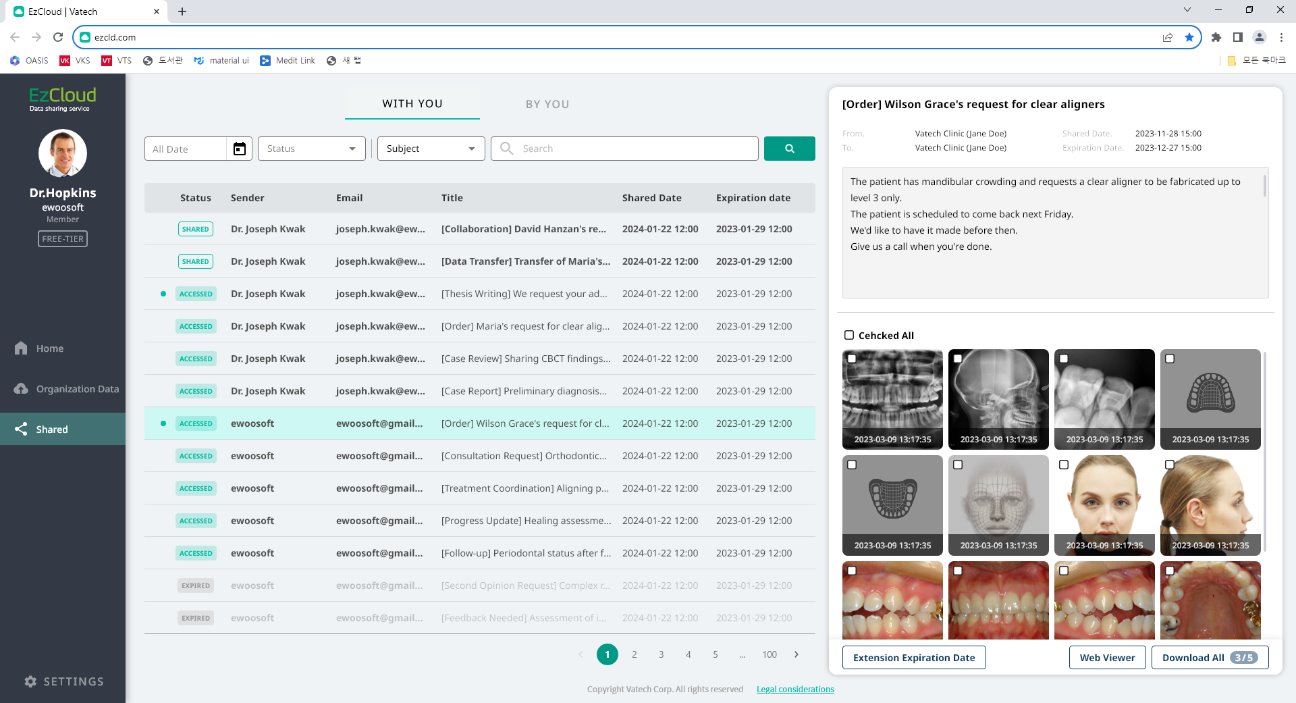
- Shared(With You) cases: You can view cases that your organization has received from other organizations.
- Search data based on the date the case was shared.
- Search data based on the activation status (shared/expired) of the case.
- Search data based on the sender, title, and email information of the case.
- Shared(By You) cases: You can view cases that members of your organization have shared with other organizations.
- You can view the following information about shared cases.
- Case activation status (shared/expired)
- Name and email address of the organization that received the shared case, and case title
- Case sharing date and expiration date
- You can delete shared cases.
(Please note that even if the case has not expired, the recipient will no longer be able to view the case once it is deleted.
Was this article helpful?
That’s Great!
Thank you for your feedback
Sorry! We couldn't be helpful
Thank you for your feedback
Feedback sent
We appreciate your effort and will try to fix the article