There are two ways to upload images to Clever Space's organizational data.
- Uploading from the image viewer application (Clever One and EzDent-i)
- Select the file you want to share from the application, then click the image upload icon on the toolbar.

- You can also upload images from Patient module by right-clicking on the image and selecting the [Send to Clever Space] option
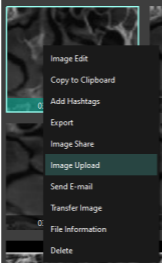
- When the [Image Upload] window appears, search for the patient or enter their email address. You can also enter a message to be sent with the data.
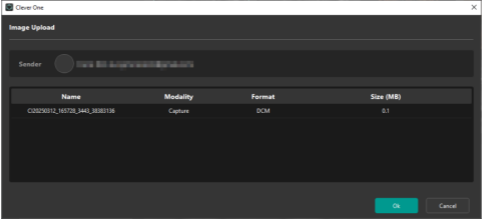
- Select the file you want to share from the application, then click the image upload icon on the toolbar.
- How to upload images directly from Clever Space (Web) (※This is a new feature added in Clever Space v1.1.)
- Select a patient from Clever Space organization data.
- Click the
 button at the top right of the patient details window that opens on the right side of the screen to open the [Add File] window.
 - Click the [Select File] button to select the image you want to upload, then click the [Upload] button at the bottom right.
Was this article helpful?
That’s Great!
Thank you for your feedback
Sorry! We couldn't be helpful
Thank you for your feedback
Feedback sent
We appreciate your effort and will try to fix the article