Follow the steps below to set the default CT image quality in Clever Space:
- Double-click an image to open the Web Viewer.
- Click [Settings] in the upper-right corner of the Web Viewer.
- Select the ‘CT View’ tab.
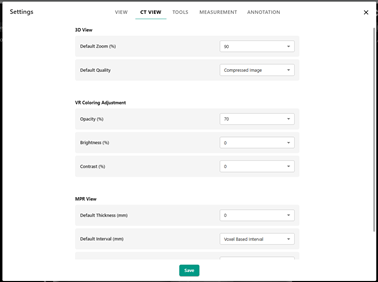
- Change the ‘Default Image Quality’ option, and then click [Save].
Was this article helpful?
That’s Great!
Thank you for your feedback
Sorry! We couldn't be helpful
Thank you for your feedback
Feedback sent
We appreciate your effort and will try to fix the article