The following work tools are available in the web viewer.
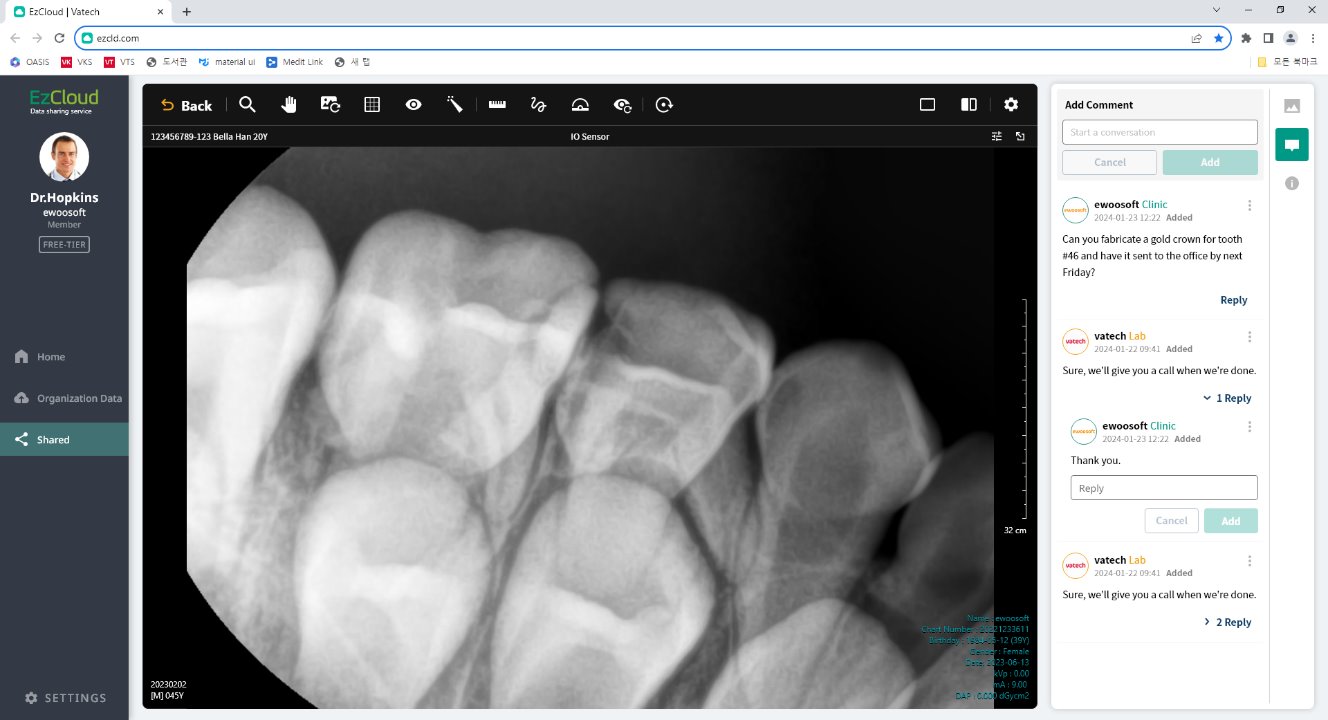
- Zoom: Click and drag the image to zoom in or out.
- Reset View: Clear all zoom settings and lines drawn with the pointer, and reset the image to its initial state when it was first opened.
- Show/Hide Grid: Display or hide the dot pattern on the image.
- Show/Hide Overlay: Display or hide your work history in EzCloud Web Viewer.
- Pointer: Draw lines on the image to mark it.
(Note: Lines drawn with the pointer are not saved.) - Length: Measure the distance between the two points marked on the image.
- Free Draw: Draw lines freely on 2D images.
- Angle: Measure the angle between the three points marked on the image.
- Rest Cloud Work: Delete all your work history from the EzCloud web viewer.
- Initialize All: Delete all your work history from applications such as Clever One and EzCloud Web Viewer.
Was this article helpful?
That’s Great!
Thank you for your feedback
Sorry! We couldn't be helpful
Thank you for your feedback
Feedback sent
We appreciate your effort and will try to fix the article